


Why Freelancer Tools and Software Matter More Than Ever
Imagine two freelancers earning the same rate: one spends 20 hours per week on admin work—invoicing, scheduling, time tracking, communication—while the other spends just 5 hours on the same tasks. The difference? The second freelancer uses the right tools.
In 2026, the freelance economy has become increasingly competitive. Clients expect professionalism, quick turnarounds, and seamless communication. Meanwhile, freelancers juggle multiple projects, different clients, varying payment methods, and complex workflows. Without the right software, you’re not just losing time—you’re losing money, credibility, and the ability to scale.
The average freelancer wastes 8-10 hours per week on administrative tasks that could be automated or streamlined. Over a year, that’s 400-500 hours—equivalent to 10-12 full weeks of work. For a freelancer earning $25 per hour, that’s ₦100,000-₦150,000 lost annually just to inefficiency.
This guide breaks down the essential freelancer tools and software you need in 2026, organized by business function, with honest comparisons of pricing, features, and real-world use cases.
The Freelancer Tech Stack: What You Actually Need
Before diving into specific tools, understand that you don’t need 50 different applications. The best freelancers build a focused tech stack around five core functions:
1. Project Management: Organizing tasks, deadlines, and client deliverables
2. Time Tracking: Recording billable hours and understanding productivity
3. Communication: Client meetings, feedback, and collaboration
4. Financial Management: Invoicing, payment processing, and accounting
5. Automation: Reducing manual work and eliminating repetitive tasks
Everything else is secondary. Many freelancers make the mistake of adopting too many tools, which creates complexity instead of solving it. The goal is to find tools that integrate well with each other and fit your specific workflow.
Project Management Tools: Organize Your Work
Project management is where most freelancers struggle. Without clear organization, deadlines slip, clients get confused, and work quality suffers.
Notion: The All-in-One Workspace
Notion has become the default choice for freelancers who want complete control over their workflow. It’s not just a project manager—it’s a database, documentation system, client portal, and knowledge base combined.
What You Can Do with Notion:
- Create custom project dashboards with status tracking
- Build client databases with contact information and project history
- Store contracts, proposals, and templates
- Manage content calendars and editorial workflows
- Create invoicing templates and financial tracking
- Build lightweight CRM systems for lead management
Pricing: Notion offers a free plan that works for most freelancers. The Pro plan costs $10/month and includes unlimited blocks and guests. For teams, the Team plan is $25/month.
Best For: Freelancers who want maximum customization and don’t mind spending time setting up their workspace. Writers, designers, consultants, and project-based freelancers benefit most.
Drawback: Notion has a steep learning curve. Setting up your workspace takes time, and it’s easy to overcomplicate things.
ClickUp: The Powerhouse Alternative
ClickUp is designed for freelancers managing multiple complex projects with dependencies, subtasks, and team collaboration.
Key Features:
- Advanced task hierarchies (projects > lists > tasks > subtasks)
- Built-in time tracking and billable hour management
- Goal setting and progress tracking
- Client portal for sharing updates without exposing your full workspace
- Automation rules to reduce manual work
- Integrations with 1000+ apps
Pricing: ClickUp’s free plan is surprisingly generous. The Unlimited plan is $7/month (billed annually), and the Business plan is $12/month.
Best For: Freelancers managing multiple clients simultaneously, those working with subcontractors or agencies, and anyone who needs advanced reporting.
Drawback: ClickUp can feel overwhelming at first. It has more features than most freelancers need, which can slow down adoption.
Trello: Simplicity First
Trello remains popular for freelancers who prefer simplicity over power. Its board-and-card system is intuitive and works well for straightforward workflows.
Key Features:
- Visual board layout (To Do, In Progress, Done)
- Card-based task management
- Checklists and due dates
- Basic automation with Butler
- Free and paid plans
Pricing: Trello’s free plan includes unlimited cards and one board per workspace. The Standard plan is $5/month, and Premium is $10/month.
Best For: Freelancers with simple workflows, content creators, and solopreneurs managing fewer moving parts.
Drawback: Trello lacks advanced features like time tracking, resource allocation, and complex reporting. It doesn’t scale well as your business grows.
Time Tracking Tools: Know Where Your Hours Go
Time tracking serves two purposes: billing accuracy and productivity insights. Many freelancers skip this step, which is a costly mistake.
Toggl Track: Simple and Powerful
Toggl Track is the gold standard for time tracking. It’s simple enough for beginners but powerful enough for complex workflows.
Key Features:
- One-click timer to start tracking
- Automatic categorization by project and client
- Detailed time reports with breakdowns
- Integration with project management tools
- Mobile app for tracking on the go
- Billable vs. non-billable hour tracking
Pricing: Toggl Track’s free plan includes unlimited time entries and basic reports. The Premium plan is $9/month (billed annually) and adds advanced reporting and team features.
Best For: Freelancers who bill hourly, need accurate records for clients, or want to understand productivity patterns.
Real-World Impact: A freelancer tracking time discovers they spend 3 hours daily on email and messaging. By batching communication, they reclaim 15 hours per week—equivalent to 2 full billable days.
Harvest: Time Tracking + Invoicing
Harvest combines time tracking with invoicing, making it ideal for freelancers who want a unified system.
Key Features:
- Time tracking with project and task categorization
- Automatic invoice generation from tracked hours
- Expense tracking
- Client portal for viewing invoices
- Payment processing integration
- Financial reporting
Pricing: Harvest’s free plan includes basic time tracking. The Pro plan is $12/month per user and includes invoicing and expense tracking.
Best For: Freelancers who bill hourly and want to streamline the invoicing process. It reduces the gap between tracking time and getting paid.
RescueTime: Automatic Productivity Tracking
RescueTime takes a different approach—it automatically tracks how you spend time across all applications and websites.
Key Features:
- Automatic time tracking (no manual timers)
- Productivity scoring and focus time tracking
- Distraction blocking
- Weekly and monthly productivity reports
- AI-powered insights and recommendations
Pricing: RescueTime’s free plan includes basic tracking. The Premium plan is $9/month and adds advanced reports and focus features.
Best For: Freelancers who struggle with time management, want to identify distractions, or need to optimize their schedule.
Communication Tools: Stay Connected Without Drowning
Clear communication separates successful freelancers from struggling ones. The challenge is staying responsive without letting communication consume your entire day.
Zoom: The Video Meeting Standard
Zoom has become the default for client calls, consultations, and presentations. In 2026, it’s essential.
Key Features:
- High-quality video and audio
- Screen sharing and recording
- Virtual backgrounds
- Breakout rooms for group discussions
- AI meeting summaries and transcription
- Integrations with calendar apps
Pricing: Zoom’s free plan allows unlimited one-on-one meetings and group meetings up to 40 minutes. The Pro plan is $14.99/month and removes the 40-minute limit.
Best For: Any freelancer who meets with clients regularly. The AI features in 2026 save significant time on follow-up documentation.
Loom: Asynchronous Video Communication
Loom lets you record screen videos with voiceover, which is invaluable for client feedback, tutorials, and project updates.
Key Features:
- Screen recording with camera overlay
- Instant sharing via link
- Transcript generation
- Comments and reactions from viewers
- Integrations with Slack, email, and project tools
Pricing: Loom’s free plan includes 25 minutes of recordings per month. The Pro plan is $12/month and includes unlimited recordings and advanced features.
Best For: Freelancers who want to reduce meetings and improve clarity. A 5-minute Loom video often replaces a 30-minute meeting.
Real-World Example: A designer uses Loom to record feedback on client designs instead of scheduling a meeting. The client watches at their convenience, provides written feedback, and the designer implements changes faster. Total time saved: 2 hours per project.
Slack: Team Communication (Use Carefully)
Slack is powerful for ongoing communication but can become a distraction if not managed properly.
Key Features:
- Real-time messaging
- Channel organization by client or project
- File sharing and search
- Integrations with 2000+ apps
- Notification controls
Pricing: Slack’s free plan includes basic messaging. The Pro plan is $12.50/month per user and includes message history and advanced features.
Best For: Freelancers working with agencies, managing teams, or collaborating with multiple stakeholders on a project.
Pro Tip: Set specific times to check Slack (e.g., 9 AM, 12 PM, 3 PM) rather than having notifications on constantly. This maintains focus while staying responsive.
Financial Management Tools: Get Paid and Stay Organized
Financial management is where many freelancers fail. Without proper systems, you lose track of income, overspend, and miss tax deductions.
FreshBooks: Invoicing Made Professional
FreshBooks is built specifically for freelancers and small businesses. It makes invoicing simple and professional.
Key Features:
- Customizable invoice templates
- Automatic payment reminders for late invoices
- Online payment acceptance (credit card, bank transfer)
- Expense tracking
- Basic accounting reports
- Client portal
Pricing: FreshBooks offers a free plan with limited features. The Lite plan is $15/month and includes unlimited invoices and clients. The Plus plan is $30/month with advanced features.
Best For: Freelancers who want professional-looking invoices and need to follow up on late payments. The payment reminders alone save hours of chasing clients.
Wave: Free Accounting and Invoicing
Wave is the best free option for freelancers with simpler financial needs.
Key Features:
- Free invoicing and accounting
- Expense tracking
- Financial reports
- Receipt scanning
- Basic tax preparation
Pricing: Wave is completely free. They make money through payment processing fees (2.2% + $0.30 per transaction).
Best For: New freelancers, those with simple finances, or anyone wanting to avoid subscription costs. Wave is genuinely free—no hidden fees or limited features.
QuickBooks Self-Employed: Tax-Focused
QuickBooks Self-Employed is designed specifically for freelancers and self-employed professionals.
Key Features:
- Income and expense tracking
- Mileage tracking
- Quarterly tax estimation
- Tax deduction categorization
- Financial reports
- Integration with bank accounts
Pricing: QuickBooks Self-Employed is $15/month (billed annually) or $20/month (monthly billing).
Best For: Freelancers who need comprehensive tax preparation support and want to avoid surprises at tax time.
Payment Processing: Get Paid Reliably
Getting paid quickly and reliably is non-negotiable. Different payment methods work for different situations.
PayPal: Global Reach
PayPal remains widely used for international payments, though fees can be high.
Fees: 2.2% + $0.30 per transaction for standard transfers. International transfers cost 4.4% + $0.30.
Best For: Freelancers with international clients, especially those on platforms like Upwork or Fiverr. Despite high fees, the convenience and global reach make it valuable.
Stripe: Flexible and Scalable
Stripe is ideal for freelancers offering subscription services, retainers, or productized services.
Fees: 2.7% + $0.30 per transaction for standard payments. Lower rates for high-volume users.
Best For: Freelancers with their own websites, those offering recurring services, or anyone needing advanced payment options.
Wise (formerly TransferWise): International Payments
Wise specializes in international transfers at mid-market exchange rates.
Fees: 0.33-1.2% depending on currency pair. Significantly lower than banks for international transfers.
Best For: Freelancers receiving payments from international clients in different currencies. Essential for Nigerian freelancers working with US or European clients.
Automation Tools: Work Smarter, Not Harder
Automation is where freelancers gain competitive advantage. The tools that automate repetitive tasks free up time for high-value work.
Zapier: Connect Your Apps
Zapier lets you create automated workflows between apps without coding.
Example Automations:
- Save email attachments to Google Drive automatically
- Create Notion database entries from form submissions
- Send Slack notifications when invoices are paid
- Generate tasks in ClickUp from emails
- Automatically archive old files
Pricing: Zapier’s free plan includes 100 tasks per month. The Starter plan is $29.99/month and includes 750 tasks.
Best For: Any freelancer with repetitive tasks. A few well-designed automations can save 5-10 hours per week.
Make (formerly Integromat): Advanced Automation
Make is more powerful than Zapier and includes advanced features like conditional logic and data transformation.
Pricing: Make’s free plan includes 1,000 operations per month. Paid plans start at $9.99/month.
Best For: Freelancers with complex workflows or those who want more control over automation logic.
Design and Creative Tools
Creative freelancers need specialized tools that balance power with speed.
Figma: UI/UX Design
Figma has become the industry standard for interface design, replacing traditional tools like Sketch.
Key Features:
- Browser-based (no installation needed)
- Real-time collaboration
- Prototyping and interaction design
- Design systems and component libraries
- Developer handoff features
Pricing: Figma’s free plan includes basic features. The Professional plan is $12/month per editor and includes unlimited files and advanced features.
Best For: UI/UX designers, web designers, and anyone creating digital interfaces. The collaboration features make client feedback easier.
Canva: Fast Design for Everyone
Canva has democratized design. Even non-designers can create professional-looking graphics quickly.
Key Features:
- Thousands of templates
- Drag-and-drop editor
- Brand kit for consistency
- Collaboration features
- Stock photos and icons included
Pricing: Canva’s free plan includes basic templates and features. Canva Pro is $13/month and includes premium templates and unlimited storage.
Best For: Freelancers who need to create social media graphics, presentations, or marketing materials quickly. Canva is faster than Photoshop for many tasks.
Adobe Creative Cloud: Industry Standard
Adobe remains the professional standard for design, photography, and video work.
Key Features:
- Photoshop for photo editing and design
- Illustrator for vector graphics
- Premiere Pro for video editing
- After Effects for motion graphics
- Cloud storage and collaboration
Pricing: Adobe Creative Cloud is $59.99/month for the full suite. Single apps are $24.99/month.
Best For: Professional designers, photographers, and video editors. The investment is justified by the industry standard status and advanced features.
Marketing and Client Acquisition Tools
In 2026, freelancers must actively market themselves. Talent alone is rarely enough to sustain a thriving practice.
LinkedIn: Professional Visibility
LinkedIn is the most important platform for B2B freelancers. A strong profile generates inbound leads.
Best Practices:
- Optimize your profile with keywords related to your services
- Share insights and case studies regularly
- Engage with your network’s content
- Use LinkedIn’s creator tools to build an audience
Cost: LinkedIn is free, though LinkedIn Premium ($39.99/month) adds features like InMail and advanced search.
Webflow: Professional Portfolio Website
A professional website is essential for credibility. Webflow lets you build high-quality sites without coding.
Key Features:
- No-code website builder
- Professional templates
- CMS for portfolio and blog
- E-commerce capabilities
- Custom domain and SSL included
Pricing: Webflow’s free plan includes basic hosting. The Starter plan is $12/month and includes custom domain and more features. Professional plans start at $25/month.
Best For: Freelancers who want a professional online presence without hiring a developer. Your website is often the first impression clients have.
ConvertKit: Email Marketing
Email is one of the highest-ROI marketing channels. ConvertKit is built for creators and freelancers.
Key Features:
- Email list management
- Automation sequences
- Landing pages
- Subscriber tagging and segmentation
- Integration with payment processors
Pricing: ConvertKit’s free plan includes up to 1,000 subscribers. Paid plans start at $29/month.
Best For: Freelancers building an audience, sharing insights, or promoting services. An email list is an asset you own, unlike social media followers.
Essential Freelancer Tools
Comparison Table: Essential Freelancer Tools
| Category | Tool | Free Plan | Paid Plan | Best For |
|---|---|---|---|---|
| Project Management | Notion | Yes | $10/mo | Customization |
| ClickUp | Yes (generous) | $7/mo | Complex projects | |
| Trello | Yes | $5/mo | Simplicity | |
| Time Tracking | Toggl Track | Yes | $9/mo | Accuracy |
| Harvest | Yes (basic) | $12/mo | Invoicing | |
| RescueTime | Yes | $9/mo | Productivity insights | |
| Communication | Zoom | Yes (40 min limit) | $14.99/mo | Video meetings |
| Loom | Yes (25 min/mo) | $12/mo | Async feedback | |
| Slack | Yes (limited) | $12.50/mo | Team chat | |
| Invoicing | FreshBooks | Yes (limited) | $15/mo | Professional invoices |
| Wave | Yes (fully free) | — | Cost-conscious | |
| QuickBooks | — | $15/mo | Tax prep | |
| Automation | Zapier | Yes (100 tasks) | $29.99/mo | Easy workflows |
| Make | Yes (1000 ops) | $9.99/mo | Advanced workflows | |
| Design | Figma | Yes | $12/mo | UI/UX design |
| Canva | Yes | $13/mo | Quick graphics | |
| Adobe CC | — | $59.99/mo | Professional design | |
| Marketing | Free | $39.99/mo | Visibility | |
| Webflow | Yes | $12/mo | Portfolio site | |
| ConvertKit | Yes (1000 subs) | $29/mo | Email marketing |
Building Your Ideal Tech Stack: A Practical Example
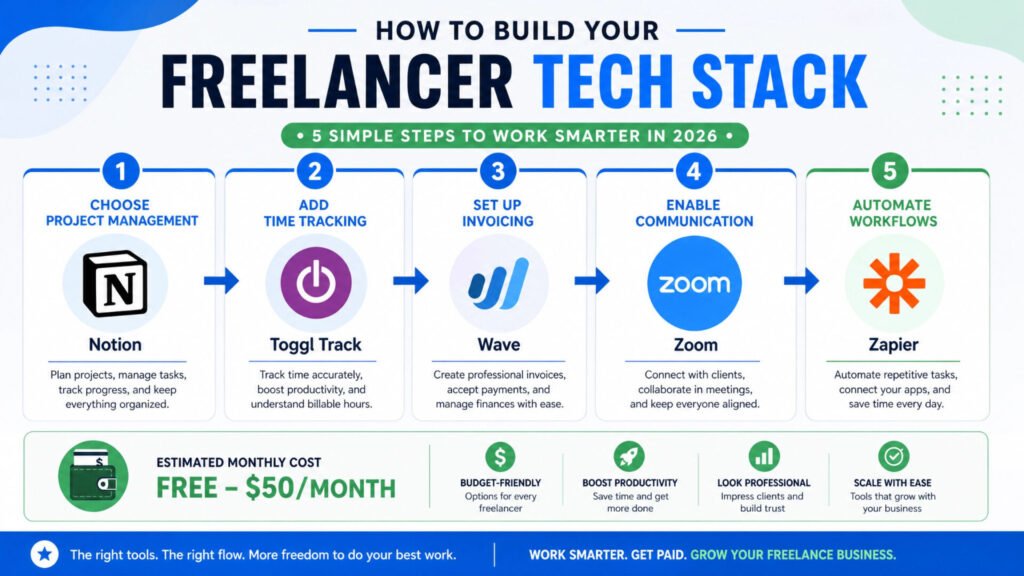
Here’s how a typical Nigerian freelancer might build their tech stack:
Budget: ₦50,000/month (~$33 USD)
- Project Management: Notion (Free) – Organize all projects and client info
- Time Tracking: Toggl Track (Free) – Track billable hours
- Invoicing: Wave (Free) – Create and send invoices
- Communication: Zoom (Free) – Client meetings
- Automation: Zapier (Free tier) – Connect apps and reduce manual work
- Portfolio: Webflow ($12/mo) – Professional website
- Email: ConvertKit ($29/mo) – Build audience and promote services
Total Cost: ~₦49,000/month
This stack covers all essential functions without overwhelming complexity. As income grows, you can upgrade individual tools.
Common Mistakes Freelancers Make with Tools
1. Tool Overload: Using 15 different apps instead of 5-6 integrated ones. This creates complexity instead of solving problems.
2. Not Integrating Tools: Tools that don’t talk to each other create manual work. Always check integration capabilities before adopting a tool.
3. Paying for Features You Don’t Use: Many freelancers pay for premium plans when the free tier would suffice. Audit your subscriptions quarterly.
4. Ignoring Automation: Freelancers who don’t automate repetitive tasks leave money on the table. Spend time setting up automations—it pays dividends.
5. Poor Data Organization: Tools are only useful if you actually use them. Many freelancers adopt tools but don’t maintain consistent data entry.
The ROI of Freelancer Tools
Let’s calculate the real return on investment:
Scenario: A freelancer earning $25/hour spends 8 hours per week on admin work without tools.
Without Tools:
- Admin hours per year: 416 hours
- Cost per year: 416 × $25 = $10,400
- Billable hours lost: 416
With Tools ($50/month):
- Admin hours per year: 104 hours (75% reduction)
- Cost per year: 104 × $25 = $2,600
- Tool cost per year: $600
- Net savings: $10,400 – $2,600 – $600 = $7,200 per year
That’s equivalent to 288 extra billable hours—more than 7 weeks of full-time work. The investment in tools pays for itself many times over.
Frequently Asked Questions
Q: Which tool should I start with?
A: Start with project management (Notion or ClickUp) and time tracking (Toggl). These two tools address the biggest pain points for most freelancers.
Q: Can I use free tools only?
A: Yes. Notion (free), Toggl Track (free), Wave (free), Zoom (free tier), and Zapier (free tier) can handle most freelance needs. You’ll eventually want to upgrade, but free tools are a great starting point.
Q: How long does it take to set up a tech stack?
A: Basic setup takes 4-8 hours. Optimization and customization is ongoing. Don’t aim for perfection—start with the basics and refine over time.
Q: Should I use the same tool for everything?
A: No. Specialized tools are better than all-in-one solutions. Use the best tool for each function, but ensure they integrate well.
Q: How often should I review my tools?
A: Quarterly. Check which tools you’re actually using, which subscriptions are worth keeping, and whether new tools might solve problems better.
Key Takeaways
1. The Right Tools Save 5-10 Hours Per Week: This translates to ₦100,000-₦200,000 annually for most freelancers.
2. Integration Matters More Than Individual Features: Five integrated tools are better than fifteen disconnected ones.
3. Start Simple and Scale: Begin with essentials (project management, time tracking, invoicing) and add tools as needs grow.
4. Automation is Your Competitive Advantage: Freelancers who automate repetitive tasks handle more clients without increasing hours.
5. Your Tech Stack Should Reflect Your Business: A designer’s stack looks different from a writer’s or developer’s. Customize based on your needs.
6. Free Tools Are Powerful: You can build a functional tech stack with zero subscription costs. Upgrade as you grow.
7. Tool Adoption is Ongoing: New tools emerge constantly. Stay curious, test new options, and don’t be afraid to switch if something works better.
Next Steps
- Audit Your Current Tools: List every tool you’re using and its monthly cost. Identify tools you’re not using and cancel them.
- Identify Your Biggest Pain Point: Is it project organization? Time tracking? Invoicing? Start by solving this with one tool.
- Map Your Workflow: Write down your typical day. Where do you waste time? Which tasks are repetitive? These are opportunities for tools and automation.
- Build Your Stack Gradually: Don’t adopt 10 tools at once. Add one tool per month and master it before adding the next.
- Set Up Integrations: Once you have 2-3 tools, spend time connecting them. This is where the real efficiency gains happen.
You can also Read:
- How to Start Freelancing in Nigeria 2026
- Best Payment Platforms for Nigerian Freelancers 2026
- Freelancer Tax Guide for Kenya
Let’s Here From You ….
Which tool has transformed your freelance business? Share your favorite freelancer tools in the comments below. Your recommendation could help another freelancer save hours every week and earn more money.
References
[1] Better Proposals – “38 Best Tools for Freelancers: 2026 Must-Haves for Scaling Your Business” – https://betterproposals.io/blog/best-tools-for-freelancers/
[2] FreelancingGig – “Best tools for freelancers in 2026” – https://www.freelancinggig.com/blog/2026/01/17/best-tools-for-freelancers-in-2026/
[3] Jobbers – “Essential Tools and Services Every Freelancer Should Know About in 2026” – https://www.jobbers.io/essential-tools-and-services-every-freelancer-should-know-about-in-2026/
[4] Monday.com – “Project Management For Freelancers: Best Tools And Tips” – https://monday.com/blog/project-management/project-management-for-freelancers/
[5] Wise – “Best Invoicing Software for Freelancers” – https://wise.com/us/blog/best-invoicing-software-for-freelancers
[6] The Digital Project Manager – “10 Best Freelance Project Management Software For 2026” – https://thedigitalprojectmanager.com/tools/best-freelance-project-management-software/